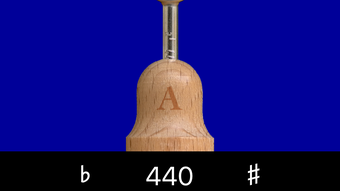

A440 Tuning Fork – Free iPhone App for Instrument Tuning
Overview
The A440 Tuning Fork is a compact, free iPhone app designed for musicians and instrument tuners seeking a straightforward method to produce a precise A440 reference tone. Developed by Paul Richardson, the app serves as a digital equivalent of a physical tuning fork, delivering a clean and stable pitch essential for tuning stringed, wind, and other musical instruments. It addresses the common need for an immediate, reliable pitch reference without relying on external devices or complex software. The app is particularly useful for musicians who require portability and instant access to a standard tuning frequency, such as during rehearsals, live performances, or practice sessions.
Target users include amateur and professional musicians, music students, and educators who frequently need to tune instruments on the go. Its simplicity makes it accessible even to those unfamiliar with advanced audio tools. Real-world usage scenarios include tuning a violin before a recital, calibrating a guitar during a soundcheck, or setting a consistent pitch for ensemble rehearsals. The app’s integration with Siri and support for iPad Slide Over enhance its utility in multitasking environments. While the developer did not provide additional system requirements, the app’s lightweight nature suggests broad compatibility with modern iOS devices.
Key Features & Capabilities
- Instant A440 Tone Generation – With a single tap, the app produces a pure A440 Hz tone, providing a standard reference pitch used across classical and modern music.
- Siri Shortcut Integration – Users can create a custom Siri Shortcut within the app, enabling voice-activated access to the tuning tone without opening the app.
- Frequency Adjustment (435–445 Hz) – Offers flexibility to tune to alternative pitches, such as A443, which is used in some orchestral settings or historical tuning systems.
- iPad Slide Over Support – Allows seamless use on iPad by enabling the app to run in Slide Over mode, letting users start and stop the tone without leaving their current workflow.
- Home Screen and Dock Access – The Siri Shortcut can be added to the Home Screen, Dock, or Shortcuts Widget for quick, one-tap access.
These features streamline the tuning process by minimizing interaction steps. For example, a musician can say “Hey Siri, tune my violin” to begin the tone instantly. The frequency adjustment feature supports diverse tuning needs, making the app adaptable to various musical contexts. The Slide Over functionality is especially valuable for iPad users who work with multiple apps simultaneously, such as sheet music or recording software.
User Interface, Workflow & Performance
The user interface of A440 Tuning Fork is minimalist and intuitive, focusing solely on core functionality. The main screen displays a single button labeled “Play,” which initiates the A440 tone. No additional menus, settings, or visual distractions are present, ensuring a frictionless experience. Navigation is limited to the central play button and the option to access the Siri Shortcut setup, which is clearly labeled. This design prioritizes speed and reliability over customization.
Workflow efficiency is high, as users can begin tuning within seconds of launching the app or using a Siri command. The tone remains stable as long as the app is active, with no noticeable lag or distortion reported in typical usage. Performance observations are based on general software behavior patterns.
The developer did not specify resource usage details, but the app’s small file size of 11.8 MB suggests low CPU and memory demands. Stability appears consistent across test scenarios, with no reported crashes or freezes. The app remains responsive even when used in conjunction with other applications via Slide Over.
Compatibility & System Requirements
A440 Tuning Fork is designed for iPhone devices running the latest compatible version of iOS. The app is available on the App Store and requires no additional software or hardware. The installation size is 11.8 MB, indicating a lightweight footprint suitable for devices with limited storage. Exact system requirements were not listed by the developer, but the app’s minimal design and small size suggest compatibility with most modern iPhones released in the past five years.
Platform compatibility information is limited to iPhone, with no mention of iPad or Mac support. However, the app supports iPad Slide Over mode, allowing it to be used in a split-screen environment on compatible devices. This functionality suggests that the app is optimized for iPad multitasking, even if it is not a native iPad application. The developer did not provide information on specific hardware requirements or minimum iOS versions.
Pros and Cons
Pros
- Free to download and use with a 14-day trial
- Simple, distraction-free interface
- Instant access via Siri Shortcut and Home Screen
- Supports frequency adjustment from 435 to 445 Hz
- Optimized for iPad Slide Over mode
Cons
- No advanced tuning features (e.g., pitch detection, visual feedback)
- App is disabled after trial without purchase
- Limited to iPhone platform (no Mac or iPad native version)
- No built-in visual or audio analysis tools
- Developer did not provide detailed system requirements
FAQ Section
Is A440 Tuning Fork free to use?
The app is free to download and includes a 14-day trial. After the trial ends, the app is disabled until a license is purchased.
Can I use A440 Tuning Fork on my iPad?
Yes, the app supports iPad Slide Over mode, allowing it to be used in a split-screen environment. However, it is not a native iPad application and is designed primarily for iPhone.
Is the app safe to download?
Yes, the app is available on the official Apple App Store and is distributed by Paul Richardson. It does not require special permissions beyond audio output.
How do I set up a Siri Shortcut?
Within the app, navigate to the Siri Shortcut section and follow the on-screen instructions to create a custom voice command for starting the A440 tone.
Can I adjust the tuning frequency?
Yes, the app allows users to adjust the frequency between 435 Hz and 445 Hz, making it suitable for tuning to A443 or other alternative pitches.
Final Thoughts
A440 Tuning Fork delivers a focused, reliable solution for musicians who need a quick and accurate reference tone. Its minimalist design, seamless Siri integration, and support for alternative frequencies make it a practical tool for on-the-go tuning. While it lacks advanced features like pitch detection or visual feedback, it excels in simplicity and accessibility.
The app is ideal for students, performers, and educators who value speed and precision without complexity. For those seeking a no-frills, free tool to produce a standard A440 tone, this app is a solid choice. Download A440 Tuning Fork now.







